Apple iOS 7 looks set to be unveiled at Apple's Worldwide Developer Conference in June. What do we know about the new operating system so far ?
Jailbreak 6.1.3 iPhone 5, iPhone 4S, iPod Touch 4G, 5G
Jailbreak 6.1.3 spread on internet:
"Evad3rs Jailbreak 6.1.3 Team has released an Untethered Jailbreak 6.1.3 and 6.1.2 via software.
This new untethered jailbreak is compatible with all devices like: iPhone 5,4S, 4,3GS, iPad 2 and 3 or iPod touch on the newly released iOS 6.1.3 and 6.1.2 firmware.
This untethered jailbreak and unlock iPhone 5/4/4S/3Gs and iPad 2/3/4 iOS 6.1.3 is running on an exploit developed by the experts, who tested it on iPhones and iPads last week before releasing it over to the rest.
iOS 6.1.3 was originally untethered jailbroken and unlocked last week but it was limited to tethered boot and it did not had the unlock option. But now, this new version of ..... we can jailbreak and unlock iPhone 5/4S/4/3Gs and iPad 2/3/4, fully untethered on iOS 6.1.3.
To Jailbreak and Unlock your iPhone 5/4/4S/3GS iOS 6.1.2 and 6.1.3 visit the official website: ......

we are not working on a 6.1.3 jailbreak, that would be too much efforts for a minimal update. We're waiting for a major release. (Pod2g)
What You Should Know About The Blackberry Unlock Codes
Blackberry unlock codes can be purchased or received for free, if you know where to look. Some mobile operators offer customers, including the unlock code at the point of sale. The only problem is that the code will, under certain conditions, such as having an active account and maintain a good payment history of several weeks or months. To avoid such circumstances, you can buy the unlock code, which is most Blackberry users do. However, there are places to get free.
What you should know about the Blackberry Unlock Codes
Each contains a specific mobile Blackberry, called the 15-digit IMEI number. This number is used to unlock the code on the device. Since each is different Blackberry model, the IMEI is found in various parts of the phone. On some phones, the issue can be found in menu, while all BlackBerry phones, the number is by dialing * # 06 # (star, hash, 06, hashing). Most Blackberry phones have the IMEI written on a slip of white paper / battery.
There are also several types of programs on the market that can be used to unlock BlackBerry devices. It is not recommended because it is difficult to determine what is real and working and what is not and can damage the phone. These programs are launching mobile solutions unlock the phone, Universal Simlock Remover, and many others.
A full selection of websites with information that can help find and use the Blackberry unlock codes are available. In addition, sites with step by step practical information on how to determine if your BlackBerry mobile phone is already unlocked.
Open BlackBerry phones are available but at a higher price than those that are blocked. Visit the shop is able to sell the phone is already open on your BlackBerry. Yet, there is no reason to buy an unlocked Blackberry when you can open it for free. Liberalisation also dramatically increase its resale value.
Note: NO SIM is needed to unlock the phone. After phone is unlocked, remove the battery, insert SIM as desired and re-insert the battery. Phone MUST be restarted to use the new SIM card.
1) Power on
2) Go to Settings
3) Go to Options
4) Go to Advanced Options
5) Go to Sim Card
6) HOLD ALT and press: mep2 (Please note that you will NOT see what you type on the screen) *
7) It will ask you for the unlock code. Enter it and then press trackball to confirm and your phone is unlocked!
* If your phone is a 9700 or 9000 that requires a second code (ie.Bell), please repeat until step 6 and press mep4 to enter the second code.
How to Enter Unlock Codes on BlackBerry Pearl (8100, 8110, 8120, 8220):
Note: Remove any SIM that is currently in the phone. After phone is unlocked, remove the battery, insert SIM as desired and re-insert the battery. Phone MUST be restarted to use the new SIM card.
1) Power on
2) Go to Settings
3) Go to Options
4) Go to Advanced Options
5) Go to Sim Card
6) HOLD ALT (Left side Below @) and press: mepp2 (Please note that you will NOT see what you type on the screen)
7) It will ask you for the unlock code. Enter it and then press trackball to confirm and your phone is unlocked!
How to Enter Unlock Codes on BlackBerry 8830:
Note: SIM is REQUIRED to unlock the phone. SIM card can be inactive, doesn't need to active. After phone is unlocked, remove the battery, insert SIM as desired and re-insert the battery. Phone MUST be restarted to use the new SIM card.
No AT&T/T-mobile Usage: This is a dual-band phone, it will NOT work in North America but will work fine in Europe, Asia, South America where they use the other set of frequencies.
1) Power on
2) Go to Settings
3) Go to Options
4) Go to Advanced Options
5) Go to Sim Card
6) HOLD ALT and press: mep2 (Please note that you will NOT see what you type on the screen)
7) It will ask you for the unlock code. Enter it and then press trackball to confirm and your phone is unlocked!
Exception: If phone says Code Error and the attempts stay the same, start off with 10 attempts and still says 10 attempts after enter code, then continue with instructions, this is just a glitch on the phone.
How to Enter Unlock Codes on BlackBerry 8700/8700c/8700g:
Note: SIM is REQUIRED to unlock the phone. SIM card can be inactive, doesn't need to active. After phone is unlocked, remove the battery, insert SIM as desired and re-insert the battery. Phone MUST be restarted to use the new SIM card.
1) Power on
2) Go to Settings
3) Go to Options
4) Go to Advanced Options
5) Go to Sim Card
6) HOLD ALT and press: mepe (Please note that you will NOT see what you type on the screen)
6) It will ask you for the unlock code. Enter it and then press jog dial to confirm and your phone is unlocked!
How to Enter Unlock Codes on BlackBerry 7105t:
Note: SIM is REQUIRED to unlock the phone. SIM card can be inactive, doesn't need to active. After phone is unlocked, remove the battery, insert SIM as desired and re-insert the battery. Phone MUST be restarted to use the new SIM card.
1) Power phone on and turn off the radio (Turn Wireless Off option)
2) Go to Tools
3) Go to Settings
4) Go to Options and select Advanced Options
5) Go to SIM Card
6) Type "MEPPD" (please note that you will not see what you type on the screen)
7) HOLD ALT and press mepp2
8) Enter the Unlock Code
9) Press enter (press on Trackball)
10) Reboot device. Device is now unlocked
How to Enter Unlock Codes on BlackBerry 7100/7130/7130c:
Note: Remove any SIM that is currently in the phone. After phone is unlocked, remove the battery, insert SIM as desired and re-insert the battery. Phone MUST be restarted to use the new SIM card.
1) Power on
2) Go to Settings
3) Go to Options
4) Go to Advanced Options
5) Go to Sim Card
6) HOLD ALT (Left side Below @) and press: mepp2 (Please note that you will NOT see what you type on the screen)
7) It will ask you for the unlock code. Enter it and then press trackball to confirm and your phone is unlocked!
How to Enter Unlock Codes on Blackberry 5xxx, 6xxx, 7xxx (Except for 7100):
Note: After phone is unlocked, remove the battery, insert SIM as desired and re-insert the battery. Phone MUST be restarted to use the new SIM card.
1) Power on
2) Go to Options.
3) Scroll to SIM CARD then press jog dial in once to select it
4) HOLD ALT (Half moon key on the lower left side) and press: mepe (Please note that you will NOT see what you type on the screen)
5) It will ask you for the unlock code. Enter it and then press jog dial once to confirm and your phone is unlocked!
How to Enter Unlock Codes on Blackberry Vodafone Storm (9500):
1) Turn off the phone
2) Need a SIM card inserted into the phone (Example: Verizon, At&t, T-mobile)
3) Turn on the phone
4) Go to Settings (Button that has dots next to green call button), Click on Manage Connections, Select 'Turn All Connections Off'
5) Press End Call (Red button)
6) Go to Settings, then Options, then Advanced Options, then SIM Card 7) Hit the Settings Button (Button that has dots next to green call button) and select 'Show Keyboard'
8) Type in mepd (Please note that you will NOT see what you type on the screen)
9) Type in mep2 or mepp2 and another screen will pop-up prompting for the MEP code (Please note that you will NOT see what you type on the screen)
10) Enter the code, Remember you ONLY have 10 chances to get it right
11) Press enter and your phone is unlocked!
How to Enter Unlock Codes on BlackBerry Storm (9530):
1) Turn off the phone
2) Need a SIM card inserted into the phone (Example: Verizon, At&t, T-mobile)
3) Turn on the phone
4) Go to Settings (Button that has dots next to green call button), Click on Manage Connections, Select 'Turn All Connections Off'
5) Press End Call (Red button)
6) Inside Settings menu, Click Options, then Mobile Network, on the switch technology to 'Global' if that has not been done.
Exception: If phone prompts 'Would you like your Blackberry to automatically select CDMA or GSM based on network availability', select No.
7) Now click the Back Arrow Button (Next to the Red End Call button) and select Advanced Options and then SIM Card
8) Hit the Settings Button (Button that has dots next to green call button) and select 'Show Keyboard'
9) Type in mep2 or mepp2 and another screen will pop-up prompting for the MEP code (Please note that you will NOT see what you type on the screen)
Exception: If nothing is prompting up and you are making sure you are selecting each button by press the screen in, do a wipe handheld to reset the phone to manufacturer default: http://forums.crackberry.com/showthread.php?t=110075
10) Enter the code, Remember you ONLY have 10 chances to get it right
Exception: If phone says Code Error and the attempts stay the same, start off with 10 attempts and still says 10 attempts after enter code, then continue with instructions, this is a glitch on the phone
11) Press the Enter key (Button that looks like a backwards L arrow)
12) A message will appear saying Code Accepted
13) Turn device off by removing battery, insert SIM of your choice if have not done so already. Turning device is necessary even if you have SIM of choice inserted.
14) Turn the phone back on
15) Go to Settings, then Options, then Mobile Network, on the third row switch Network Technology to GSM/UMTS.
16) Press the Back Arrow Button to exit and save settings.
17) Return to the main screen by pressing End Call and you should see your phone getting signal
18) As a reminder, if you ever remove the SIM card from your phone, you will need to set the Network Technology as GSM/UMTS again
Issues:
1) If you have issues with the phone not recognizing the network, make sure the radio is on by making sure it is not low on power.
2) If you follow the above instructions and code is accepted with the Network Technology set to GSM/UMTS and still not working, it may be the SIM needs to be replaced with a newer SIM Card.
Removing "Activation Required" on the screen or changing the Phone Number:
1) On the main screen of the phone, press Call (Green Button)
2) Type on the screen: ##000000
3) Press the Call Button
4) For the Mobile Directory Number, put in your phone number in there
5) After you have done that, press the Menu Button to Save the options and the phone will automatically restart
6) After restarting, it will be updated
How to Enter Unlock Codes on BlackBerry Tour (9630):
1) Turn off the phone
2) Need a SIM card inserted into the phone (Example: Verizon, At&t, T-mobile)
3) Turn on the phone
4) Go to Settings
5) Go to Options
6) Go to Advanced Options
7) Go to Sim Card
8) HOLD ALT and press: mep2 (Please note that you will NOT see what you type on the screen)
9) Enter the code, Remember you ONLY have 10 chances to get it right
10) Enter it and then press trackball to confirm and your phone is unlocked!
11) A message will appear saying Code Accepted
12) Turn device off by removing battery, insert SIM of your choice if have not done so already. Turning device is necessary even if you have SIM of choice inserted.
13) Turn the phone back on
14) Go to Settings, then Manage Connections, then Mobile Network Options and set the Network Technology to GSM/UMTS.
15) Set Network Mode to 3G & 2G.
16) Press the Back Arrow Button once to exit and save settings.
17) Inside the Manage Connections, set Mobile Network to on.
18) Return to the main screen by pressing End Call and you should see your phone getting signal
19) As a reminder, if you ever remove the SIM card from your phone, you will need to set the Network Technology as GSM/UMTS again
Issues:
1) If you have issues with the phone not recognizing the network, make sure the radio is on by making sure it is not low on power.
2) If you follow the above instructions and code is accepted with the Network Technology set to GSM/UMTS and still not working, it may be the SIM needs to be replaced with a newer SIM Card.
VERIZON TOURS ONLY: Removing "Activation Required" on the screen or changing the Phone Number:
1) On the main screen of the phone, press Call (Green Button)
2) Type on the screen: ##000000
3) Press the Call Button
4) For the Mobile Directory Number, put in your phone number in there
5) After you have done that, press the Menu Button to Save the options and the phone will automatically restart
6) After restarting, it will be updated
SPRINT TOURS: If you need to remove the Activation Required, you will need to get the MSL code to remove it. Contact me on costs.
How to get the Emails to work on the Storm (Includes Service Books for email to function):
How to Enter MSL Code on Sprint BlackBerry Tour (9630):
1) From the mainscreen of the BlackBerry, press the green call button to enter the phone
2) Type in ##MSLCODE then the green talk button (ie: ##123456 Green talk button)
3) In the CDMA service edit screen, delete the number in the first row (000000xxxx) and replace it with your current phone number
4) Press the menu key and choose save
5) The device will re-boot
6) When the device re-boots, Activation Required will be gone and the active carrier name will now appear.
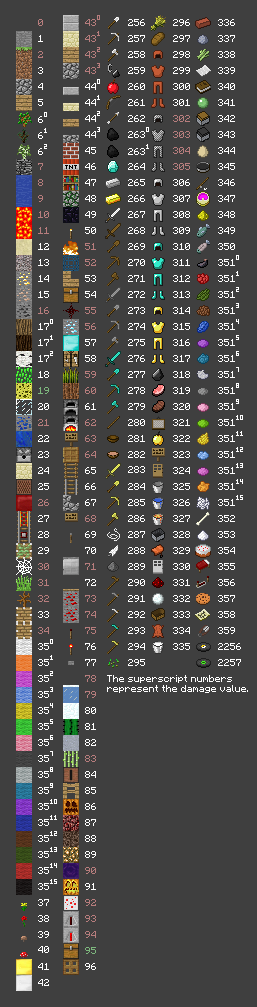
Minecraft Hileleri Single Player Commands İtem kodları
Minecraft oyuncularının arayıpta bulamadığı birşeydi herhalde bu :) Hile diye yazsanız çıkmaz şu an benim gibi Türk Bloggerlar bu işe el atınca bu tip aramalar Google arama sonuçlarında yer almaya başlayacak :) Şimdi anlatıma geçiyorum.
Bu indireceğiniz dosyanın oyuna katkısı çok size birtakım komutlar vererek oyunu daha keyifli oynamanızı sağlıyor, tabi bu kişiden kişiye değişir. Dosyanın yüklenmesi çok kolay öyle o klasörü aç oraya kopyala bunu sil onu sil yok Giriyorsunuz PATCH'a tıklıyorsunuz o oyunun yolunu bulup işini hallediyor, size düşen tek şet item kodlarını ve komutları bir yere kaydetmek :) Aşağıdakiler Single Player Commands adlı modun komutları bunları oyundayken chat kısmına standart olarak T harfine basarak yazacaksınız.
achievement <list|unlock> - Allows you to list or unlock all achievements
alias <NAME> <COMMAND> {ARGS} - Allows you to assign an alias to one or more words
ascend - Moves you to the next platform above your position
atlantis - Toggles atlantis mode on/off
biome - Tells you what biome you are currently in
bind <KEYCODE> <COMMAND> {COMMANDPARAMS} - Binds a command to a keyboard button.
bindid <ID> <COMMAND> {ARGS} - Binds a command to a keyboard key using the key id
bring [ENTITY] - Brings the specified entity to you.
cannon [STRENGTH] - Bulunduğunuz yere TNT atar.
chest <drop|get|fill|swap|clear> - Allow access of chests
clear - Clears the console
clearwater - Toggles water clarity on/off
clone [QUANTITY] - Clones the NPC which you are looking at
config <setglobal [reset]> - Allows you to set the global configuration file as your current configuration
confuse [DISTANCE] - Confuses nearby mobs
confusesuicide - Makes mobs attack one another
cyclepainting - Cycles through the painting which you are pointing at
damage - Turns player damage on/off
defuse [all] - Defuses any TNT nearby which has been hit, drops 1 tnt in its place
descend - Moves you to the next platform below your position
destroy [all] - Destroys the current item
difficulty <LEVEL> - Sets the difficulty to the specified level (0-3)
drops - Turns item drops on/off, having them turned off will make the game run a little bit faster, and also stop your inventory from filling.
dropstore - This command transfers everything in your inventory into a chest that it creates next to you.
duplicate [all] - Duplicates and drops the currently selected item stack
explode [SIZE] - Bulunduğunuz alanı patlatır.
exterminate [SIZE] - KillNPC with style, kills the NPC you are pointing at
extinguish|ext [all] - Puts out all nearby fire (or all fire)
falldamage - Turns fall damage on/off
firedamage - Turns fire damage on/off
flammable <BLOCK> [CATCH] [SPREAD] - Sets the specified block at the flammability level
fly [SPEED] - Uçmanızı sağlar
flymode standard - Allows you to turn on standard flying mode
freecam - 3. kişi görünümü
freezecam - Freezes the players camera at the current location
freeze - Freezes mobs so that they cannot move or attack you
goto <NAME> - Goto a waypoint
grow [all] - Grows all saplings/wheat on the map.
heal <HEALTH> - Karakterinize can basar.
health <min|max|infinite> - İnfinite yazarsanız ölümsüz olursunuz.
help [COMMAND] - Gives general help when COMMAND isn't specified, gives specific help when COMMAND is specified. Same as /h
helmet [ITEM] [QTY] [DAMAGE] - Specifies the helmet the player wears
home – Teleport to spawn point
infiniteitems - Toggles infinite items on/off
instantkill - Tek vuruşta mobları öldürürsünüz.
instantmine - Tek vuruşta önünüze geleni kırarsınız.
instantplant [grow] - Instantly plants saplings into the ground, if grow is specified the tree will when instantly grow
item <ITEMCODE|ITEMNAME> [QUANTITY] [DAMAGE] – Gives player item, if quantity isn’t specified maximum amount of that item. Same as /give and /i
itemdamage - Turn item damage on/off. This means you will never have to repair an item again
itemname - Use this command to discover the itemname and ID of your currently selected item.
itemstack <ITEMID|ITEMNAME> [QUANTITY] - Almak istediğiniz itemin id'sini ve kaç adet istediğinizi yazın.
jump - Moves you from where you are to where your mouse is pointing. Note: This command is buggy and may put you in the block you move to.
keepitems - Turn this on and you will keep your items when you die.
kill – Kills the current player
killall <ENTITYTYPE> - Kills all of the specified entity type, this will destroy ALL entities (paintings, minecarts, etc) unless specified otherwise.
killnpc [all|monster|animal] - Kills all living creatures nearby.
light - Tüm ışıkları açar.
listwaypoints - Lists all waypoints. Same as /l
longerlegs - Boyunuzu bir block yükseltir.
macro <edit|create|dir|folder|delete|list|FILENAME {PARAMS}> - Runs a macro
maxstack [ITEMID|ITEMNAME|all] [STACKSIZE] - Configures the maximum stack size of that item between 1 and 64.
mobdamage - Moblar size vurunca işlemez.
moveplayer <DISTANCE> <DIRECTION> - Karakterinizi istediğiniz yöne istediğiniz uzaklığa taşır, örn: 65 north
msg <MESSAGE> - This commands adds a message to the console.
music [play|pause|skip|stop|VOLUME] - Requests a music track to be played, there is a limitation of at MAX 2 tracks per day. Set the volume by specifying VOLUME.
noclip - Turns no clip on/off.
output - This just toggles SPC messages on/off, useful for macros/scripts.
phelp [COMMAND] - Provides help for plugins
platform - Puts a glass square under your feet
plugin <list|enable [MODNAME]|disable [MODNAME]|dlist> - Lists all loaded plugins and also allows you to enable/disable plugins
pos – Gives current player position. Same as /p
ralias <NAME> - Removes the specified alias
reach <DISTANCE|reset> - Sets the player reach distance.
refill [all] - Re-stocks your items in your inventory to the maximum ammount
rem <NAME> - Removes the specified waypoint
removedrops [all] - Düşen itemleri olduğu yerden siler.
rename <COMMANDNAME> <NEWNAME> - Allows you rename a command to a new name
repair [all] - All derseniz üstünüzde ne var ne yok hepsini tamir eder.
repeat - Repeats the last used command (useful command to bind)
reset - Resets the player settings
resize [1080p|720p|480p|setdefault [WIDTH]|<HEIGHT>] - Resizes the Minecraft window, no arguments sets it to default
reskin <FILENAME> - Reskins the NPC which you are pointing at to the specified skin
return - Moves the player to the last position before teleport
ride - Allows you to ride any NPC which you point at
sc <FILENAME> - Added scripting support (more information coming soon)
search <SEARCHTERM> - Allows you to search for items using a name
set <NAME> - Mark a waypoint on the world
setjump [JUMP|reset] - Sets the height that you jump. Note: Turns fall damage off if the jump is configured to move than 1.
setspawn [<X> <Y> <Z>] – Set the current position as the spawn point, if X Y Z are specified sets that position as spawn point
setspeed [SPEED|reset] - Sets the speed that the player moves
skin <USERNAME> - Change your players skin to ANY minecraft player
slippery <BLOCK> [SLIPPERYNESS] - Makes the specified block slippery, default is 0.6
spawn <NAME|ID|random|list> [QTY] - Allows you to spawn an individual creature.
spawnportal - Spawns a portal nearby the player
spawnstack <NAME|ID|list|random> - Spawns the specified creature a few blocks away from your current position (use "/spawn list" to get a list of creature names and codes).
stackcombine - When run combines all of the same stack types into the same stack
stacklimit - Turns stack limiting on/off
startup <COMMAND> {ARGS} - Specifies a command to run on startup
superheat [all] - Turns items which are furnace-able into their furnaced form
superpunch [DISTANCE|reset] - Vurdumu inletir cinsten bir yumruk atarsınız.
tele <X> <Y> <Z> - Teleport to X Y Z coordinates. Same as /t
textcolor <<normal|error> <0-f|random>>|<setrandom COLORS> - Allows you to configure output text colors
time [set|get|day|night [minute|hour|day [TIME]]|speed SPEED] - Zamanı ayarlar.
timeschedule <reset | <TIME1> <TIME2>> - Sets a period of time (HH:MM format), this will make minecraft always within this time.
unbind <KEYCODE|all> - Unbinds the specified key from a command.
unbindid <ID> - Unbinds a command from a keyboard key using the key id
update <enable|disable> - Turns update checking on/off
useportal - Instantly transfers you to the nether, use it again to go back.
waterdamage - Turns water damage on/off
weather <lightning|thunder|rain> - Toggles weather on/off
world <load|save|seed|new|exit|list|backup> - Allows you to explicitly, have control over your world.
world load <FILENAME> - Loads the specified FILE, this allows you to play ANY save on your computer, not just World1-5, and can have any name
world save - Explicitly saves your game then returns to it
world seed [SEED] - Allows you to see and change the seed of the map, so it will generate custom terrain
world new [FILENAME] [SEED] - Creates a new map at the specified location
world exit - Lets you exit a game without saving (perfect from when a creeper blows something up)
world list - Lists all the saves which you can load from ".minecraft/saves"
world backup - Allows you to backup your current world into .minecraft/backupVe aşağıdakilerde istediğiniz itemi almak isterken kullanacağınız kodlar örnek kod altın balta için /itemstack 286 1 buradaki 286 altın baltanın kodu 1 ise kaç adet istediğinizdir.
![]() |
| İtem kodları |
Ve işin en ballı kısmına geldik tüm bunları yapabilmeniz için gerekli olan programı indirmek için aşağıdaki yeşil butona basınız :)
![]() |
| Rar şifresi: www.furkanozden.blogspot.com |
Registry Tweaks to Enhance Your Windows XPerience – 14 Part | Oxerjen NEWS |
In time, the Microsoft Windows XP tweaking series covered a lot of ground, from minor to serious, these optimizations were mostly software/OS oriented. So, we thought it’s about time to ‘sing another song’ and go from software to hardware tweaks. In today’s episode, we’ll only cover printing tweaks, mostly intended for printer servers or users dealing with large amounts of printing jobs, but some of them might also be useful to any average user owning a printer.
For those of you just joining us, here’s the deal with this series: it provides immediate access to registry tweaks hidden in Windows XP that will help you unlock cool features just by using Notepad. You don’t need to install any other tweaking program, because you’ll do the optimizations by yourself.
As usual, before we get started, you’ll need to perform a few steps that are thoroughly explained in the first article of tweaking series. Please take the time and read it now, as these steps are essential to the tweaking process and you may not understand the purpose of the following line…
Now that you’ve read the first article and the tweaks.reg file is opened in Notepad with the Windows Registry Editor Version 5.00 line at the top, let’s start tweaking. Please be advised that, as opposed to some of our previous episodes, these tweaks should only be activated if you’re absolutely certain they apply to your computer’s configuration.
[HKEY_LOCAL_MACHINE\System\CurrentControlSet\Control\Print]
“DisableServerThread”=dword:00000001
Let’s start with a useful tweak for people using a print server: after you add the two lines above to the tweaks.reg file and run it, the print spooler will no longer send shared printer info to other print servers. To enable the server thread, just replace 1 with 0 in your tweaks.reg and run it again.
[HKEY_LOCAL_MACHINE\SYSTEM\CurrentControlSet\Control\Print]
“SpoolerPriority”=dword:00000001
Since we’re on the subject, let’s take a look at another tweak for the printer spooler. This service in Windows XP has the same priority as most of the other services on your workstation: Normal. By adding the above two lines to your tweaking file, you’ll change the service’s priority to High – a neat trick if your computer is often used to print a large amount of paper. You can always set the priority back to normal, by replacing 1 with 0 and running tweaks.reg again, of course.
[HKEY_LOCAL_MACHINE\System\CurrentControlSet\Control\Print]
“SchedulerThreadPriority”=dword:00000001
This tweak also revolves around priority and printing: it allows users to easily control the overall priority of the printer scheduler thread. Setting the dword to 1 will elevate the priority to above normal, whereas 0 sets it back to normal priority.
[HKEY_LOCAL_MACHINE\SYSTEM\CurrentControlSet\Control\Print\Providers]
“EventLog”=dword:00000000
The Event Log stores a lot of information, most of which can be useful to power users, but there are cases when events aren’t important enough to be logged. This could be one of those cases: by adding the lines above to your tweaks.reg file your operating system won’t add an entry to the event log each time a print job occurs on the spooler.
[HKEY_LOCAL_MACHINE\SYSTEM\CurrentControlSet\Control\Print\Providers]
“NetPopup”=dword:00000001
As you surely know, each time a print job has been completed, Windows notifies you by displaying a popup message in the system tray. The two lines above enable you to easily control this behavior: by setting the dword to 0 you can disable the notification and setting it to 1 will enable it.
[HKEY_LOCAL_MACHINE\SYSTEM\CurrentControlSet\Control\Print\Providers]
“NetPopupToComputer”=dword:00000001
Feel free to use this tweak for switching the location of printer notifications. By setting the NetPopupToComputer dword to 1, printer notifications will be displayed on the workstation that the user first logged on to, but if you change to 0, notifications will be shown on the local PC.
[HKEY_LOCAL_MACHINE\SYSTEM\CurrentControlSet\Control\Print]
“BeepEnabled”=dword:00000001
For the final trick, we’ve got a security-related tweak: as you might have guessed already, if you add the two lines above to your tweaking file, the computer will beep when a remote job error occurs on a print server. If you find this annoying, you can always turn it off, of course, by replacing 1 with 0 and running tweaks.reg again.
That’s all for today’s episode of the Microsoft Windows XP tweaking saga. We’ll be back soon with more hardware tweaks that will surely come in handy. Until then, if you have any comments or suggestions of your own, don’t hesitate to let us know.
Until then, feel free to take a look at some other interesting Windows XP tweaks in the previous articles of our series:
part 1 , part 2, part 3, part 4, part 5, part 6, part 7,part 8, part 9, part 10, part 11, part 12, part 13
Source:Pctipsbox.com
Apple iPhone 4 Black Smartphone 16GB by Apple – Price: $769.95 in Amazon | NEWS | from All of the WORLD | Oxerjen NEWS
Technical Details
- Does not include AT&T service contract
- Facetime
- Retina Display
- Multitasking
- HD Video Recording
- 5MP Camera
Apple iPhone 4 Black Smartphone 16GB by Apple - Price: $769.95 in Amazon
buy now Apple iPhone 4 Black Smartphone 16GB

This review is from: Apple iPhone 4 Black Smartphone 16GB (Wireless Phone Accessory)
This is the best mobile phone I have ever owned. I held off on buying the iPhone for the first three generations because it is locked to AT&T in the USA and you can only acquire apps through Apple's proprietary App Store. This sort of closed platform was a real put-off to me (and still is), but when it came time to buy a new mobile phone (my old one was dying) I knew there was only one choice. So I bit the bullet and got an iPhone 4.

It's damn near perfect. I can't speak for the small percentage of users having the infamous antenna problem because it has not affected me, and I strongly suspect the press is blowing that issue out of proportion to drive traffic to their websites or whatever. Don't pay too much attention to that though because even the best technology is still not perfect. The iPhone 4 is not perfect, but it IS the best technology in the mobile phone market today. Apple takes great care to ensure that its products will be intuitive and user-friendly. Compare the touch functionality of the Droid to that of the iPhone and you will know what I'm talking about. Apple also owns the patents on such unique technology, so don't expect the Droid to surpass the iPhone anytime soon.
With this 4th generation model we have seen more new features introduced than ever before. First of all, the Retina Display is a pleasure to use and once you use it you will come to view all lower resolution displays as sub-standard. The resolution bump in the outward-facing camera as well as the introduction of a user-facing camera is what really sold me on this product. The boost in battery life assures that you will no longer need to worry about your iPhone's battery dying half-way through the day - unless you do a LOT of gaming on it! It utilizes the A4 chip, same as the iPad, so it's plenty fast. It is thinner and lighter than previous models, the volume controls and vibrate switch have been made more durable, it has a built-in gyroscope, supports FaceTime video chat and on-the-go video editing via the iMovie app.
Consider whether to buy the 16GB version or the 32GB version. Since I have a large iTunes library I chose the 32 and am glad I did. Calculate the sum of your photos, music, and your videos, then leave some room for apps and that should give you an idea of which model to buy. The 32GB version is roughly $100 more.
For international customers:
It is important to consider that the iPhone 4 is sold as a locked device in most countries. That is to say that if you plan to use it on an unsupported network you will first need to Jailbreak the phone and then unlock it. This is a convoluted process and currently can only be done on models running iOS 4.0 and no later. Furthermore, running firmware updates on a jailbroken iPhone will "brick" it, rendering it useless. In other words it's a huge pain in the ass. If you have any plans to use this phone overseas you need to be aware of that. If you even suspect that you may move abroad within the next two years DO NOT buy this product! You will be charged an Early Termination Fee by your service provider and then you most likely still will not even be able to use your iPhone abroad. This is the reason I give the iPhone 4 only four stars instead of five. On a trip to Japan I asked SoftBank if they would be able to connect my American AT&T iPhone to their network - after all it is MY property that I own and have paid for. Their answer was that since the serial number is for a U.S. phone their system cannot even register it. They couldn't accept me as their customer even if I wanted to pay them.
So there you have it, folks. The iPhone is a lock-in deal, and a slap in the face to those who travel or move overseas. Buying an iPhone in the United States with "no contract" doesn't mean you can use it as you wish - it just means you will pay more. It is still locked to AT&T. If you want an unlocked iPhone you must purchase it in Australia, France, and possibly New Zealand, Italy, or Belgium. I don't know for a fact which countries are offering unlocked iPhones - all I know is that there is a huge difference between "unlocked" and merely "no-contract", so pay attention to what you are getting and do your own research on this matter.
The one nice thing Apple has done for its international customers is make the interface available in a vast number of languages - something Microsoft still can't manage to deliver without special installation procedures (even on its primary operating system: Windows).
Whether you speak Spanish, Korean, Japanese, or Hebrew, the you will feel at home using the iPhone, or any Apple device for that matter.
The mystical white iPhone:
From the beginning we have been promised a white iPhone option as well. For whatever reason Apple has delayed production of the white version. We can only assume that there was a logistical reason why these white phones could not be manufactured to Apple's standards and were delayed as a result. Whether this option will still be offered at all is a matter of debate. I personally don't care. If you love the color white, just buy a white case. Having a white border around your iPhone's screen would probably be more distracting than the black anyway.
More about the 3G plan:
Once upon a time AT&T offered an unlimited data plan. Those days are no more. However if you are already an unlimited data plan subscriber (i.e. an existing iPhone user) then you are "grandfathered in" and may keep your existing unlimited data plan for $30/month. The plan offered to new iPhone customers is a measly 2GB for $25/month, so if you have an unlimited data plan then by all means keep it!
On a final note, the App Store is one of the features that makes Apple's mobile devices unique and great. Here are a few apps worth checking out:
- Dropbox (View the files that are synced with your computer from anywhere.)
- DropText (View and create plaintext notes that instantly sync with your computer.)
- iBooks (The best way to read books - the selection is growing every day.)
- Galcon (Über-addictive Real-Time Strategy game.)
- Google Earth (It's just cool, what can I say?)
- AT&T MyWireless (Track your voice and data usage.)
- Flashcards Deluxe (Highly customizable study tool.)
- NanoStudio (Mobile Digital Audio Workstaion! Sounds amazing.)
- MobileMe iDisk (MobileMe is way overpriced, but if you use it this app will make your experience better.)
- Angry Birds (Everybody seems to love this game for some reason. So you should buy it, I guess?)
- Archetype (If you like First-Person Shooter games this is for you!)
- Pandora Radio (nice for users on an unlimited data plan - streaming net radio anywhere, customized to your tastes!)
- The Apple Store App (This was just recently introduced. It is basically a way of optimizing your Apple Store experience. Recommended if you prefer shopping through retail to shopping online.)
Sorry this review has been so lengthy. If you have read it through to the end you are a trooper and I commend you! My goal was nothing more than to give a detailed and insightful overview of what the iPhone 4 experience will bring you.
I wish you all the best.
amazon.com
How to Fix VirtualBox USB Support
It
is actually a known fact that there is an issue with VirtualBox and the
attached USB devices that many of us are trying to use in the virtual
machine. Here is a real-life example:
I am a 100% Linux user and I have a photo printer that Linux can’t recognize. Let’s say that I want to print some photos quickly, to give them to someone. I have a Windows installation in a virtual machine just for this reason (sad, I know) and I want to access my printer,
which is connected via a USB port. To my surprise, I can see the
printer in the USB device list of VirtualBox, but I can’t access it
(very frustrating). Firing up Firefox and searching on Google for a fix takes too long, because there are many old tutorials that teach you how to modify various files
or change permissions, etc. What to do? Well, below is the answer to
the endless VirtualBox – USB issue (and it’s pretty damn simple too!).
This tutorial was created mostly for my needs, but I am sure that many of you will find it very helpful. Ready?
This is how a default installation of VirtualBox in Ubuntu 9.04 shows the USB devices, and we need to fix it.
Step 1: Go to System -> Administration -> Users and Groups…
Step 2: Click the “Unlock” button…
Step 3: Type your password and click the “Authenticate” button….
Step 4: Click on the “Manage Groups” button…
Step 5: In the “Groups settings” window that will
appear, scroll down until you see the vboxusers entry. Select it and
then click on the “Properties” button…
Step 6: Another window will appear, called “Group
‘vboxusers’ Properties. Just check the box in front of your username and
click the “OK” button when you’re done…
Step 7: Close the “Group settings” and “Users
Settings” windows and log out. Log in and open up VirtualBox, start your
virtual machine and you will see that you can now access the USB
devices!
pctipsbox.com
RICHMOND, Va. – You can pretty much do anything with your iPhone these days — control your digital video recorder from afar, unlock your car, and now, fly a drone.
Parrot, a company known more for its Bluetooth handsfree car speakerphones, has launched a small, unmanned aircraft that can be controlled using an iPhone or another of Apple Inc.'s Wi-Fi-enabled gadgets, including the iPod Touch and the iPad. After reading about it online, I felt compelled to take the drone for a test drive because, honestly, what gadget geek wouldn't want one?
The $300 AR.Drone is a quadricopter — a helicopter with four separate propellers — made of carbon fiber and strong plastics.
Weighing less than a pound, the gadget can fly up to 11 mph, controlled from up to 150 feet away. The drone has two built-in cameras that stream video of what it sees directly to your iPhone, or another Apple device. You then control aspects of the flight by tilting the iPhone from side to side, using the gyroscope in the device.
Don't worry if you don't have a good cellular or Wi-Fi connection. The drone has its own Wi-Fi system to communicate directly with the iPhone without needing to go through an outside Wi-Fi hotspot.
The setup was quite easy. After downloading the free app from Apple's iTunes store and charging the battery for the AR.Drone, I was ready to fly. With one touch of a button on the screen, the AR.Drone was hovering about three feet off the ground. Landing is just as simple, with one on-screen button that slowly lowers the drone to the ground.
Admittedly, the controls take a while to master. The easiest way is to tilt your iPhone to control the flight. There's also an advanced mode, which lets you control the drone with a virtual joystick. It's possible to guide the drone by looking at the video feeds, but I found it much easier to look at the aircraft itself.
Make sure your first test drive is in an open area like a field or big backyard that gives you room to experiment with the controls without crashing into everything. When the drone arrived at my office, colleagues were excited to see it fly. We regretted our haste when initial flights bashed the drone into filing cabinets.
During our outdoor field tests, the drone ended up in a nearby forest. Thankfully, the cameras on the drone gave me an idea of where it crashed. While the drone was noticeably affected by the wind outside, it has technology that tries to minimize the drifting.
You can fly the drone inside buildings more safely by attaching the included plastic foam bumpers, which protect the drone and anything you may run it into. (And trust me, you will run it into things.) If you get into trouble, there's also an emergency landing button that completely shuts off the motors and drops the unit to the ground.
I was able to master flying it after a couple of sessions, but was always cautious about where I flew it.
As fun as the AR.Drone is to fly, there are a few downsides. The battery only lasts about 15 minutes when fully charged, so if your flight requires a long drive to an open football field or parking lot, it might not feel worth it. You can, however, buy extra batteries for $30 each.
And, for now, the app used with the AR.Drone only controls flying movements and displays feeds from the on-board cameras.
But I find the future possibilities exciting. Parrot plans to update its app with augmented reality games. You can race other actual drones or chase and shoot virtual enemies that appear superimposed on the video feed from the drone.
Parrot also has made its technology for the AR.Drone open source, meaning any programmer can build his or her own games or find other ways to use and control the drone. I could see one that lets users record the video feed or take screen shots while flying.
While it comes with a hefty price tag, the open platform puts the AR.Drone in the category of promising gadgets for those with extra cash to spend. It's fun to play with now, but you might want to wait until you can do more with it.
___
Online:
AR.Drone: http://ardrone.parrot.com
___
Need help with a technology question? Ask us at gadgetgurus(at)ap.org.